SDI vs. HDMI | What’s the Difference?
Dec 19 2025

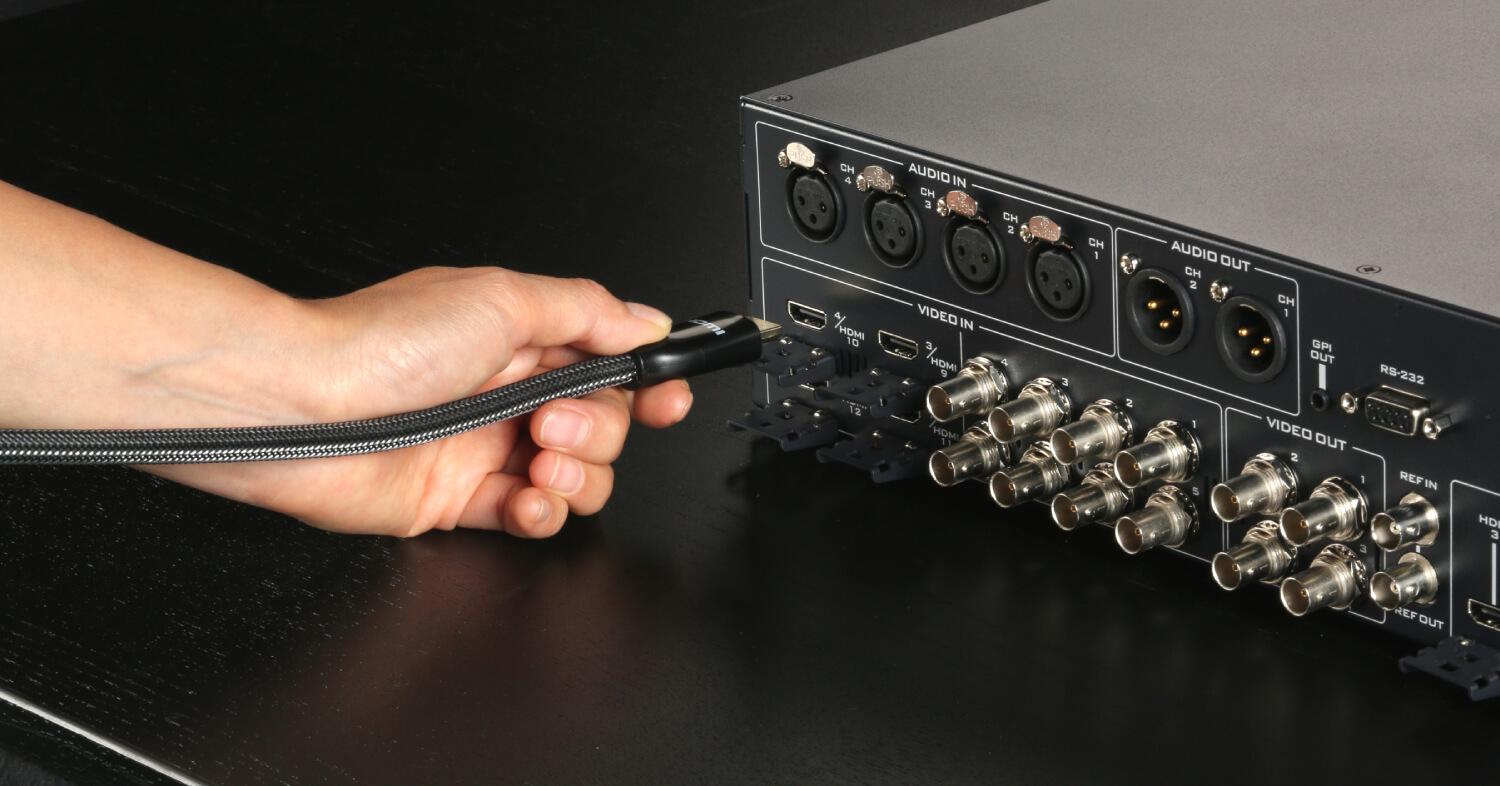
When working with professional video equipment, such as cameras, monitors, switchers, and recorders, you will often encounter two standard video signal interfaces: SDI and HDMI. Both are capable of transmitting video signal along with embedded audio, but they serve different purposes in professional and consumer applications. So, what exactly sets them apart? Let’s take a closer look.
Serial Digital Interface (SDI) is a professional-grade digital standard designed to transmit high-quality, uncompressed video and audio signals over a single cable. SDI uses coaxial cables, ensuring minimal signal loss or degradation, even over long distances.
It is widely used in live broadcasting, studio production, and other environments where signal stability and reliability are critical. This makes SDI the backbone of professional live production systems, from camcorders and monitors to switchers and recorders.
The common SDI standards include
Unlike analog signals, which are prone to distortion from noise and difficult to restore once corrupted, SDI transmits digital signals in binary form. This allows accurate decoding even in the presence of minor interference, ensuring clean and stable video transmission.
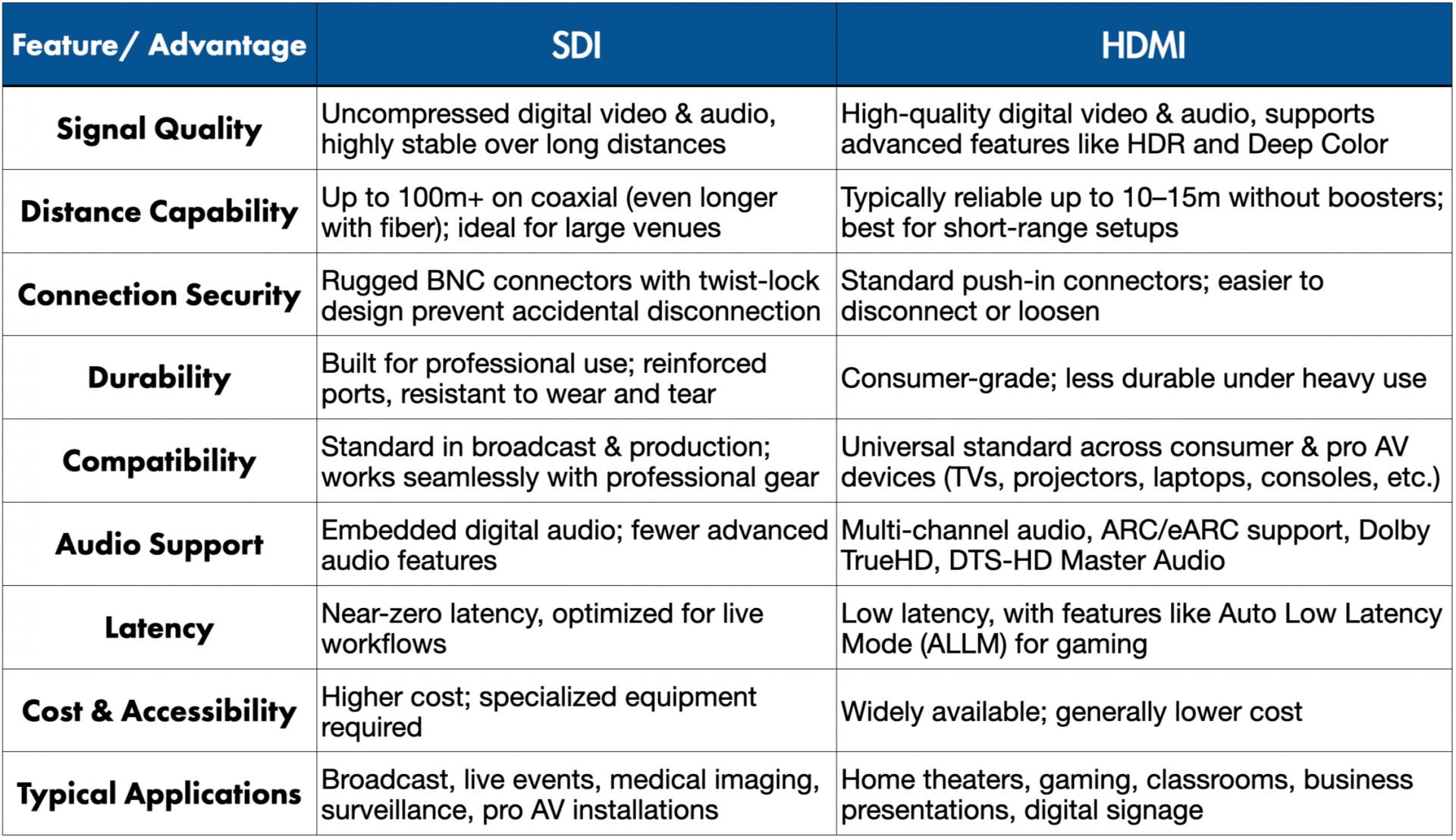
SDI is built for long cable runs, making it ideal for scenarios where cameras and other equipment are far from the control room. HDMI, by contrast, is designed for shorter distances, typically within a single room or workspace.
SDI connectors use a twist-lock bayonet design that prevents accidental disconnections. Once locked in place, the cable cannot easily be pulled out, ensuring a reliable connection during live production. SDI ports are also typically mounted on reinforced metal backplanes, making them more durable than standard HDMI connectors.

SDI is widely used in industries where reliability and uncompromised quality are essential:
HDMI (High-Definition Multimedia Interface) is a digital standard widely used in consumer electronics to transmit high-quality audio and video between devices. Initially developed by Hitachi, Matsushita, and Sony as a replacement for analog audio/video cables, HDMI quickly became the universal connection for modern multimedia.
Today, you’ll find HDMI ports on TVs, monitors, laptops, cameras, projectors, and gaming consoles. Unlike SDI, HDMI also supports two-way communication—allowing devices to exchange information. For instance, a computer can automatically detect the resolution and capabilities of a connected monitor, making setup much easier.
HDMI cables come in several connector types, each designed for specific use cases:
The most common connector is used in TVs, monitors, and laptops. This full-size port is what most people recognize as a standard HDMI connection.
Introduced in 2002 with the original standard, this less common connector supports dual-link video signals. It uses 29 pins instead of 19, but it is rarely seen in consumer devices.
A smaller version is often found on portable devices, such as camcorders or tablets. Despite its size, it can deliver full 4K resolution at 60 fps.
Even smaller than Mini HDMI, measuring just 6.4 × 2.8 mm. It packs all 19 pins into its tiny design, making it space-efficient. Although less common, it is found on some compact cameras and portable devices.
Primarily designed for in-vehicle entertainment systems, the HDMI Type E interface is engineered to withstand the demanding conditions found inside automotive environments. Due to significant variations in temperature and humidity, HDMI Type E features high heat resistance, moisture resistance, and enhanced mechanical durability, ensuring stable and reliable signal transmission even under constant vibration and harsh operating conditions.
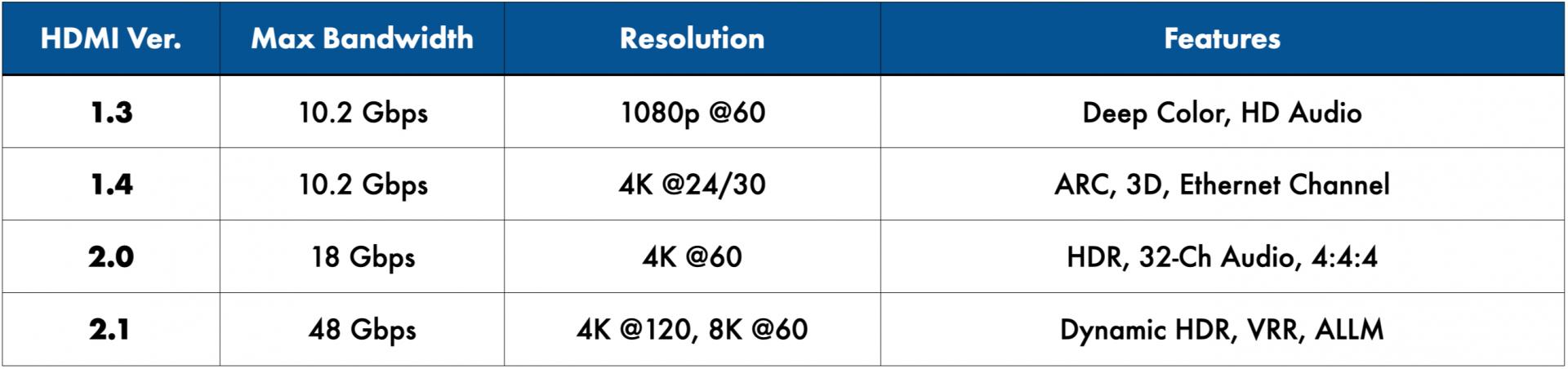
Since its specification was finalized in 2002 and officially released in 2003, HDMI has continuously evolved in terms of bandwidth, resolution, video formats, and functional capabilities. From the early days of Full HD to today’s mainstream 4K and the move toward 8K, growing demands for higher resolution, wider color gamut, and higher frame rates have driven the advancement of HDMI standards. Below is an overview of the key features and differences between HDMI versions 1.3, 1.4, 2.0, and 2.1, providing a clear understanding of each generation’s capabilities.
HDMI 1.3 primarily focused on improving color performance and audio specifications. It increased maximum bandwidth to 10.2 Gbps and introduced Deep Color support, enabling color depths of up to 30-bit, 36-bit, and even 48-bit at the specification level. It also supports high-quality audio formats such as Dolby TrueHD and DTS-HD Master Audio. This version significantly improved the stability and quality of 1080p transmission, forming a solid foundation for the Full HD era.
With the introduction of HDMI 1.4, 4K resolution and additional convenience features became available. It was the first HDMI version to support 4K resolution (up to 30Hz) and introduced Audio Return Channel (ARC), allowing audio to be sent from a display back to a soundbar or AV receiver through the same HDMI cable, simplifying home theater cabling. HDMI 1.4 also supports 3D formats and the HDMI Ethernet Channel, enabling audio, video, and network data to be transmitted over a single cable.
With HDMI 2.0, 4K applications became more mature and widely adopted. Bandwidth was increased to 18 Gbps, enabling support for 4K@60Hz video for smoother motion performance. HDMI 2.0 also supports 4:4:4 chroma sampling and up to 32 audio channels. With the subsequent HDMI 2.0a and 2.0b updates, HDR support—including HDR10 and HLG—was added, making HDMI 2.0 a mainstream interface across televisions, cameras, video switchers, and professional AV equipment.
The latest HDMI 2.1 standard significantly elevates audio and video transmission performance, delivering up to 48 Gbps of bandwidth. It supports resolutions up to 8K@60Hz and 4K@120Hz, and introduces advanced features such as Dynamic HDR, Variable Refresh Rate (VRR), and Auto Low Latency Mode (ALLM). These enhancements provide powerful performance for high-end gaming, post-production workflows, and high-resolution professional video applications. With the increasing adoption of Ultra High Speed HDMI Cables, HDMI 2.1 is becoming a key technology for next-generation high-resolution video transmission.
HDMI enhances video quality by supporting high resolutions such as 1080p, 4K, and even 8K, along with advanced features like HDR (High Dynamic Range) and Deep Color for richer visuals. With Dynamic HDR, brightness and color are adjusted scene by scene, making it ideal for movies and gaming, while Display Stream Compression (DSC) ensures high-quality transmission without compromising performance. Its ability to deliver higher refresh rates provides smooth, apparent motion, and the digital signal offers sharper images and more detail for an immersive viewing experience. Additionally, HDMI’s support for HDR and advanced color technologies expands color range and contrast, delivering richer tones, greater accuracy, and a more vibrant overall picture.
Using HDMI cables significantly enhances sound quality. Many cables support Audio Return Channel (ARC) and Enhanced Audio Return Channel (eARC). These technologies simplify your setup by allowing audio to flow both ways between devices. You can enjoy rich audio formats like Dolby TrueHD and DTS-HD Master Audio, providing an immersive sound experience. The ability to support multiple audio channels allows you to enjoy surround sound systems without compromising quality. Furthermore, features like Auto Low Latency Mode (ALLM) help minimize delay during gaming or live events, ensuring audio syncs perfectly with visuals for a captivating experience.
As a universal standard, HDMI is built into thousands of devices, from TVs and projectors to laptops, gaming consoles, and professional AV systems. This widespread adoption ensures seamless cross-brand compatibility, making HDMI the preferred connection for both home and professional environments.
HDMI cables are the backbone of modern home theaters, connecting TVs with Blu-ray players and audio systems. They deliver high-definition video and surround sound, often supporting 4K and HDR content for superior quality. Many AV receivers also use HDMI to manage multiple input sources.
Consoles such as PlayStation and Xbox rely on HDMI to output high-definition graphics and immersive audio. With HDMI 2.0 or higher, users can enjoy 4K HDR gaming at smooth frame rates. ARC support also helps route audio back to a soundbar or receiver, making setup easier.
In business and education, HDMI enables the connection of projectors, monitors, and PCs for presentations and lectures. It ensures clear, detailed visuals in conference rooms and classrooms. HDMI is also widely used in digital signage and broadcasting, often with splitters that send the same signal to multiple displays.